Utilities for Testing with Pandas and Pytest
Brief introduction to snapshot testing and how to test pandas with pytest
Introduction
Some people have been telling me that they don’t know what we do at Clarity.AI and that they’ve never touched 1 line of python. That’s why I’ve decided to make a mini introduction to what we do almost daily at Clarity.AI with the technology stack we handle (Python, Pandas and pytest)
Pandas and snapshot testing
Pandas is a python library with which we can create data structures (Dataframes) and perform all kinds of operations that come to mind. For example:
animales = ['perro','gato','cocodrilo']
acciones = ['ladra','juzga','muerde']

dataframe = pd.DataFrame({"animal": animales, "accion": acciones })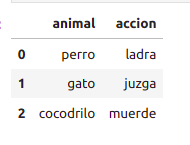
With this we already have a defined structure of columns and rows with which we can do calculations, statistics and many other operations.
Generally when working with thousands of data points it’s possible that you want to check on more than one occasion if there are some values that have changed overnight because the data provider has touched that file or there has been some change in the code without us realizing that causes a failure. For this there are several strategies and one of them is snapshot testing.
Snapshot testing consists of comparing the results of correct processes, that is, with “good” values with the current results of your function. To imagine a bit better the above, let’s think of a data provider that gives us 1 file with 1 million rows and I’m interested in those that contain some positive value. I make a function to filter values and I get 500k rows. I know that those rows will always be the same unless they modify the file, in which case the result could be altered and end up with 600K rows. With snapshot testing we can see at the moment that there is an error when comparing it with the “valid” file of 500K rows.
Another example but with code could be that we start from a very very basic and simple method that replaces in the values column the values that you pass by parameters in a dictionary
Class Transform:
...
def replace_in_values_column(dataframe: pd.DataFrame, values_to_replace: Dict[int, int]):
    return dataframe.replace(values_to_replace)
...
And then we define the test that will follow the traditional given-when-then scheme:
 class TestUtils:
 def test_replace_values_in_columns(self):
     dataframe = pd.DataFrame({
            "metric": ["metric_a", "metric_b"],
            "metric_year": ["2021", "2021"],
            "value": ["1", "2"]
        })
        expected_dataframe = pd.DataFrame({
         "metric": ["metric_a", "metric_b"],
            "metric_year": ["2021", "2021"],
            "value": ["5", "2"]
        })

     result_df = Transform.replace_in_values_column(dataframe, {"1": "5", "2": "6"})

     assert_frame_equal(result_df, expected_df)
What we just saw is not snapshot testing but a normal test with some example values. To transform it we must replace the dataframe and expected_dataframe variables with file reading methods from an external file (which we will have previously prepared with an amount of real data and another with the resulting transformation). This way we will know that for 1 set of data the transformation done to it will always be the same.
class TestUtils:
 def test_replace_values_in_columns(self):
     dataframe = pd.read_csv('provider_data/december.csv')
        expected_dataframe = pd.read_csv('tests/resources/expected.csv')

     result_df = Transform.replace_in_values_column(dataframe, {"1": "5", "2": "6"})

     assert_frame_equal(result_df, expected_df)
If we have an automatic process that gets information from a data provider every month and we want to make sure they don’t change something that breaks the transformation flow, we can do this to check if they’ve added data without notifying us or have changed some value.
Parametrize
Another of the small wonders we work with is the option to parametrize a test so that we save ourselves duplicating the test for different cases.
Parametrize is defined just above our test and the way we connect it is by adding as test parameters the variables we define in parametrize:
@pytest.mark.parametrize("filename, expected", [
        ("tests/resources/update_securities.csv", "tests/resources/expected_update_securities.csv"),
        ("tests/resources/master_securities.csv", "tests/resources/expected_master_securities.csv")
])
def test_if_column_names_are_fixed(self, filename, expected):
 update_securities = pd.read_csv(filename)
    expected_df = pd.read_csv(expected)

 result_df =  fix_columns(update_securities)

    assert np.array_equal(expected_df.columns, result_df.columns)
We define within 1 string in parametrize 2 variables called filename and expected, which enter the test as parameters and that we will use in this case when we are going to read files. This way we save ourselves having to make 1 different test for each one.
In the same way variables can be defined that meet for example a regular expression and thus test that given some strings it picks those that meet the expression.
Patch and fixture
Fixtures are used to provide data that all tests can access
@pytest.fixture
def config_key(self):
 return "test_download"

@pytest.fixture
def config_regex(self, config_key, regex):
 config = ConfigParser()
    config.add_section(config_key)
    config.set(config_key, "user", "test_user")
    config.set(config_key, "password", "test_password")
    config.set(config_key, "uri", "sftp://localhost:22")
    config.set(f"{config_key}.op1", "regex", regex)
    return config
At any point in our test class we can reference config_key and config_regex to obtain data without writing them with each new test
On the other hand, Patch is what pytest uses to mock what we want and are going to use inside the test:
 @mock.patch("Tasks.ftp.Client")
 def test_run_type_regex(self, mock_client, config_regex, config_key):
  task = FTPMove(config_regex, config_key)
    task._download_regex = mock_client.MagicMock()

 task.run()

 task._download_regex.assert_called_once()
This way we can indicate to the test that the Client class is mocked and we can reference it inside the test with the name we give it as parameters, in this case mock_client.
This way we can bypass inside Client the _download_regex function and even tell it to return the values we want (in this case it doesn’t apply).